
Samsung is rolling out a new February 2026 software update for three of its new foldable smartphones – Galaxy Z Flip 7, Fold SE, and TriFold – bringing stability improvements and the latest security enhancements. With the new patch, the Galaxy Z Flip 7 gets firmware version F766NKSSAZB2 in a 429MB package, the Galaxy Z Fold SE gets firmware version F958NKSSCZB2 in a 438MB file, and the Galaxy Z TriFold receives firmware version F968NKSS3AZB2 in a 438MB package.
The Galaxy Z Fold 7 received its February patch yesterday, and now more foldable phones are receiving the latest rollout based on One UI 8.
The update is currently available for users in South Korea and will expand to other major countries in the coming days. Since launch, it is the first firmware update for the Galaxy TriFold device. It was launched in January in its home country, and this month it has been introduced in the US with limited units.
What’s New in February 2026 Patch
Galaxy Z Flip 7 Changelog:
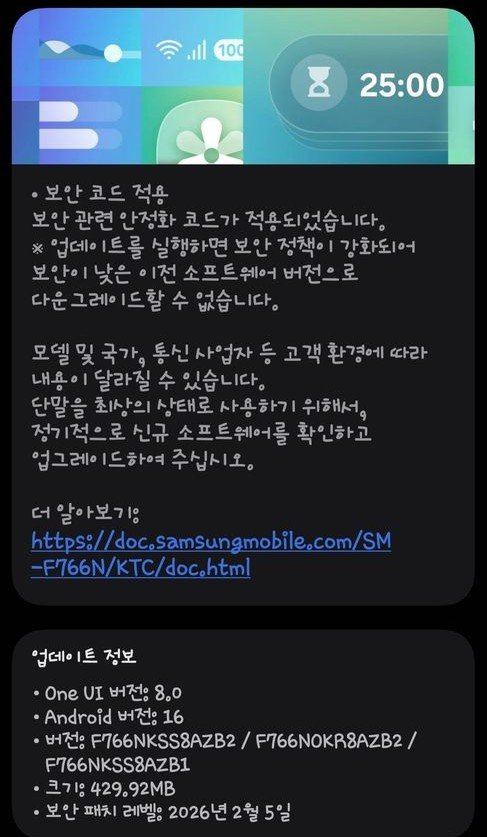
Firmware Version: F766NKSSAZB2
Update Size: ~429MB
Security Level: February 5, 2026
OS: Android 16/One UI 8.0
Changes: Bug fixes, improved security
Region: South Korea (expanding soon)
Galaxy Z Fold SE Changelog:
Firmware Version: F958NKSSCZB2
Update Size: ~438MB
Security Level: February 5, 2026
OS: Android 16/One UI 8.0
Changes: Bug fixes, improved security
Region: South Korea (expanding soon)
Galaxy Z TriFold Changelog:
Firmware Version: F968NKSS3AZB2
Update Size: ~435MB
Security Level: February 5, 2026
OS: Android 16/One UI 8.0
Changes: Bug fixes, improved security
Region: South Korea (expanding soon)
While Samsung has not revealed a detailed changelog, the update appears to focus on app & services optimizations and overall system stability. It also includes the latest Android security patch to strengthen device privacy and security. All of these foldable devices are eligible to receive the next major One UI 8.5 update, which is expected to launch next week alongside the Galaxy S26 Ultra.
As with other Galaxy Z Fold devices, the rollout is happening in stages. Users who have not yet received a notification can manually check for the update by going to Settings → Software update → Download and install on their device.


Leave a comment